Board Directors Portal: What It Does and How to Use It
In the 2024 proxy year, only 58% of S&P 500 boards appointed at least one new director, for an average of 0.83 new directors per board, according to Spencer Stuart's 2024 U.S. Board Index. That's the context for every board search. Seats open rarely, papers carry real liability, and the system you use to read, vote and keep records tells you a lot about how a board governs. A Board Directors Portal isn't just storage. It's where your preparation, your confidentiality duties and, increasingly, your route to the seat itself meet.
Table of Contents
- What a Board Directors Portal Provides
- Using the Portal Day to Day
- Security Controls to Check Before You Log In
- How AI Tools Change Portal Confidentiality
- Finding Board Seats Through Opportunity Platforms and Search Tools
- How to Run a Board Search Step by Step
- What Happens After You Are Appointed
- Confirm Your Board Search Plan This Week
What a Board Directors Portal Provides
A board pack sent the week before a meeting exposes how a board runs. In a loose setup, you get a large PDF by email, then a revised version, then a committee paper in a separate thread. You can't be sure which version the chair will use, who else received it, or whether your notes sit on a personal drive outside any control.
A Board Directors Portal replaces that scatter with a governance-control system. Agendas, board packs, decisions, minutes, notifications and compliance records sit under controlled permissions and an auditable activity history. You log in, open the current pack, annotate inside the system, and leave a record a company secretary or auditor can reconstruct later. For a candidate weighing a seat, that structure is diligence evidence: it shows how the board treats confidentiality, version control and accountability before you've attended a single meeting.
Core Portal Modules and Who Uses Them
| Module | What it holds | Main users |
|---|---|---|
| Agenda and board papers | Central, versioned board pack | Directors and company secretary |
| Voting and resolutions | Recorded decisions with timestamps | Chair and company secretary |
| Minutes | Draft, review and approval trail | Company secretary and directors |
| Committee workspaces | Separate papers with restricted access | Committee members |
| Notifications | Alerts when papers change or deadlines approach | All users |
| Activity logs | Record of views, downloads and edits | Auditors and administrators |
Many boards still work without anything like this. In a survey of 1,400 respondents cited by the Australian Institute of Company Directors, 13% still used printed board books, 62% relied primarily on email and PDFs for preparation and distribution, and 25% used generic digital tools such as SharePoint or Google Drive rather than purpose-built governance software.
Those workflows fail in predictable ways. Papers go to the wrong address. Version control turns ambiguous when three attachments share a filename. Administrators hold weak evidence of who opened, changed or approved a document, which becomes a problem when a decision is later questioned.
Before you accept a seat, look at whether directors actually use the portal, whether permissions are visible, and whether a written usage policy exists.
A polished login page tells you nothing. Consistent use, restricted committee spaces and a clear activity trail tell you the governance team runs a disciplined process, especially for audit, risk and remuneration material. If you're still on the candidate side of the table, the same standard applies to the tools you use yourself: a dashboard demonstration of a controlled board-search workflow shows what auditable process looks like before you ever join a portal.
Using the Portal Day to Day
A typical cycle starts before the meeting, when the company secretary publishes papers and you receive a deadline notification. Your job is simple in principle. Find the current version in the portal, not an attachment someone forwarded.
One Board Cycle in Six Steps
- Set up access before the first meeting. Enrol with the approved authentication method, confirm which committee workspaces you can see, and set alerts for paper changes and deadlines. Don't leave access checks until the night before.
- Check version status when a notice arrives. Confirm you're opening the latest published pack and note its revision date. The portal's version control only helps if you stop working from old downloads.
- Read and annotate inside the platform. Keep highlights and private notes in the portal rather than copying papers into a personal document. Your working notes then stay under the same controls as the papers themselves.
- Vote inside the portal where the chair enables it. Check that each resolution records your decision with a timestamp. If a vote happens outside the system, ask how it'll be captured.
- Review draft minutes through the approval trail. Flag corrections before the company secretary finalises them, while discussion is still fresh. Late corrections create avoidable disputes about what was agreed.
- Close the loop on devices. Log off shared devices and clear any permitted offline copies after the meeting, following the board's policy.
Expect the activity log to record your views and downloads. Auditors and administrators can see that record, and that's intentional. It protects you too, because it shows you received and reviewed the material you were asked to decide on. I'd treat any request to move discussion to personal email as a warning sign.
Security Controls to Check Before You Log In
Treat the portal as a governance-control system, not a document repository. Interface polish isn't evidence of safety. What matters is whether a stolen password, a lost phone or one compromised account can expose the whole board pack.
The NACD and Internet Security Alliance guidance for directors recommends phishing-resistant authentication and discourages reliance on SMS, email or phone one-time passwords when stronger methods are available, and it points to reputable portal services with end-to-end encrypted communications. Its example reporting metrics also set useful thresholds, including more than 98% of critical assets protected by MFA and more than 90% of vendors maintaining current SOC 2 Type 2 reports.
Use the table as the checklist: for each control, look for evidence, not polish.
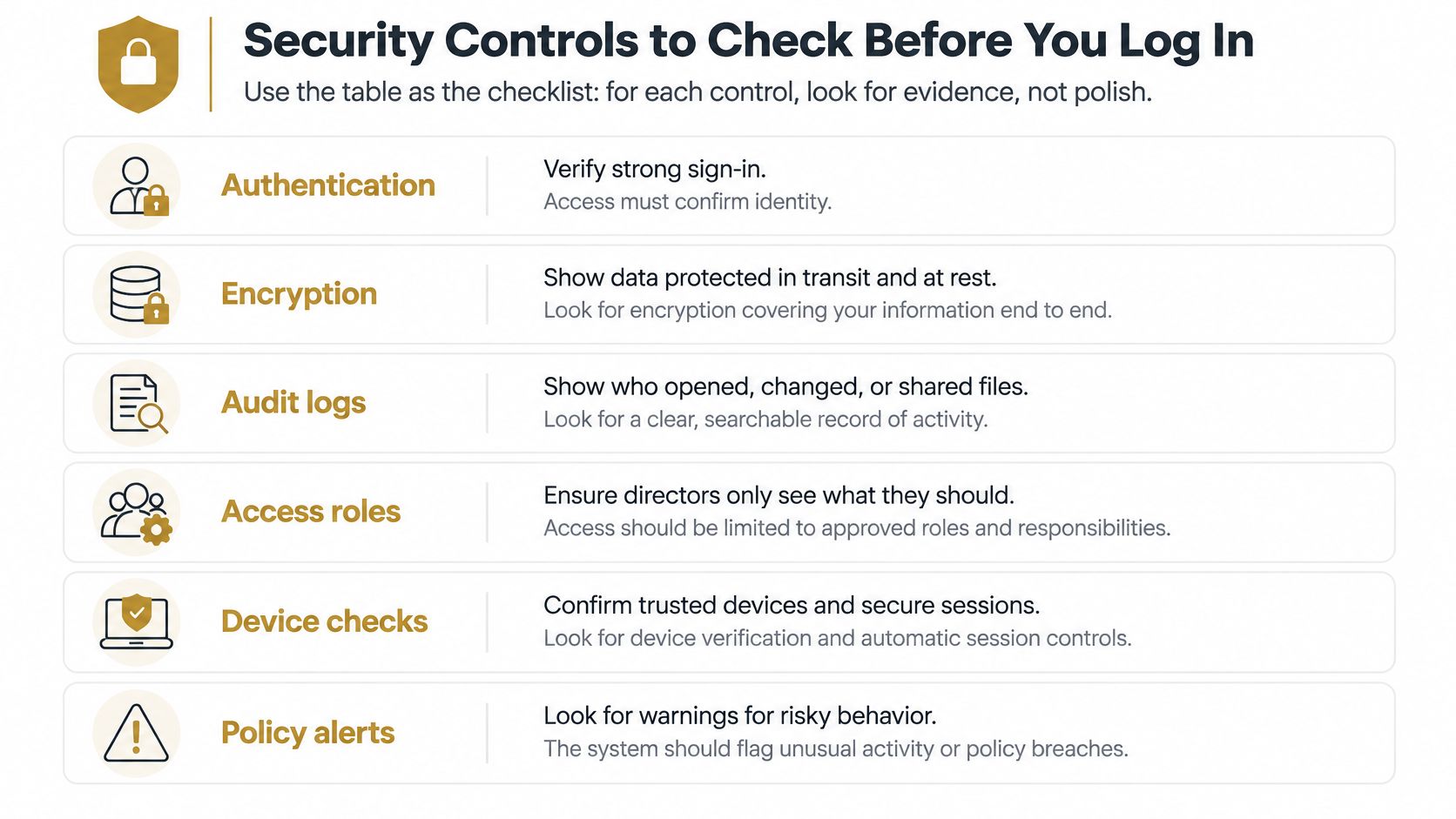
| Control | What good looks like | Why it matters |
|---|---|---|
| Phishing-resistant MFA | Passkeys or hardware keys, not SMS or email codes | Stolen passwords alone cannot open papers |
| MFA coverage | Over 98% of critical assets protected | Gaps let one weak login reach everything |
| End-to-end encryption | Encrypted communications and files | Limits exposure during transmission |
| Role-based permissions | Access set per director and committee | Limits damage from one compromised account |
| Account recovery | Verified, controlled recovery process | Recovery paths are a common attack route |
| Session and device control | Remote sign-out and device revocation | A lost device stops being an entry point |
| Vendor assurance | Over 90% of vendors with current SOC 2 Type 2 report | Independent evidence rather than marketing claims |
Account recovery deserves separate attention, because attackers target reset routes when login controls are strong. Granular permissions then limit the blast radius if an account is compromised. Before you rely on a provider, read its privacy commitments alongside four direct questions. Which independent audits does it hold and when were they issued, is there a documented incident-response procedure, how do you revoke a device, and what do access logs record and who can read them?
How AI Tools Change Portal Confidentiality
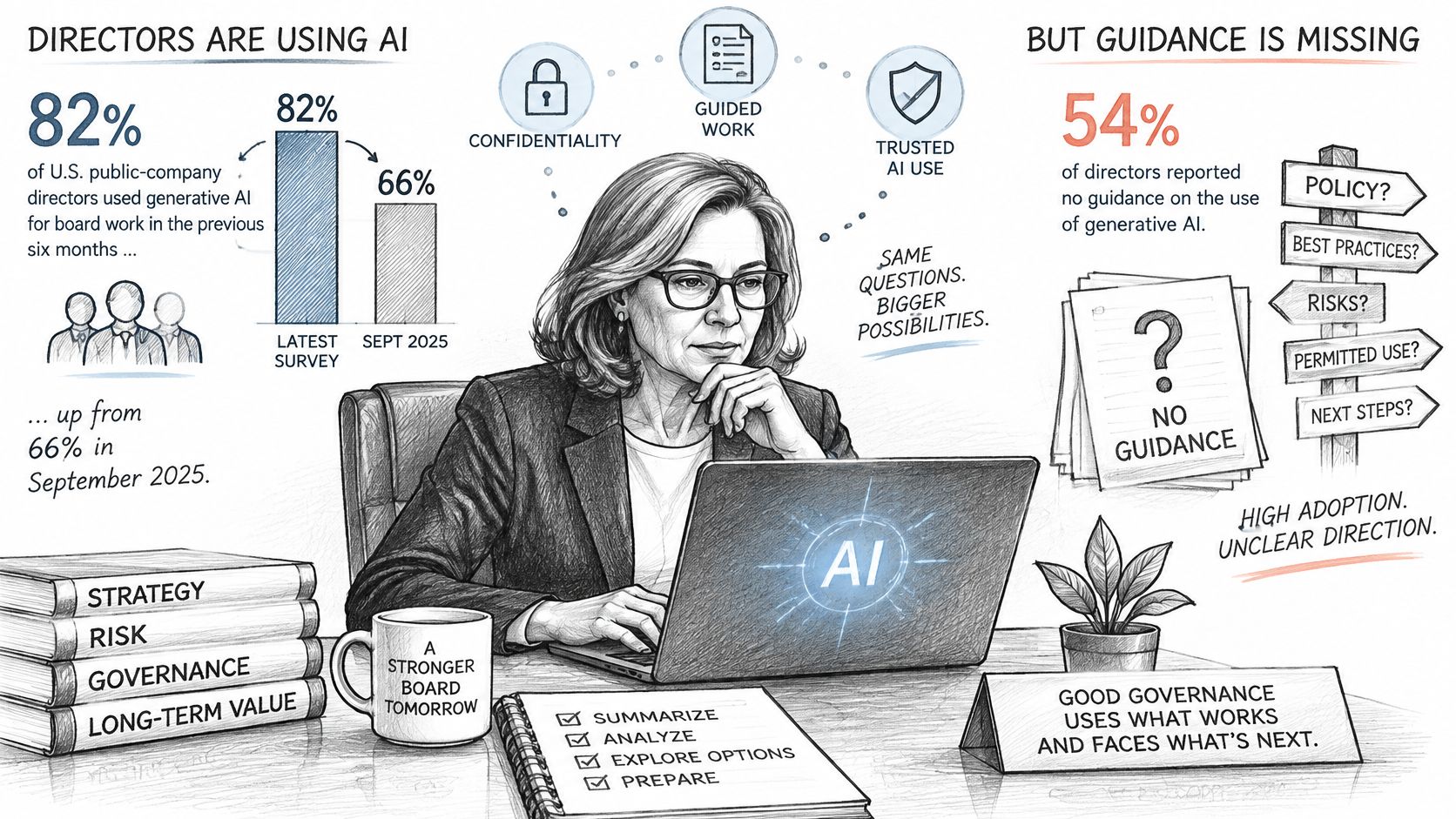
Directors have adopted AI faster than boards have written rules for it. A survey of U.S. public-company directors reported by Board Member found 82% had used generative AI for board work in the previous six months, up from 66% in September 2025, yet 54% reported having no guidance for directors' AI use and only 6% had a formal board-specific policy. In the same survey, 49% had heard of board members using public or consumer AI tools for board work.
This visual sets out that adoption and guidance gap.
A secure portal doesn't automatically stay secure when a director pastes a confidential pack into an outside summariser. The document controls may be sound while the new data flow sits outside them. Portal discussions still tend to focus on access, packs and voting, while AI creates copies, prompts and outputs that need their own rules.
Four Questions You Should Be Able to Answer
- Can you summarise confidential materials with AI? If the policy doesn't say, don't assume silence means permission.
- Is the embedded tool barred from training on board data? Look for a contractual restriction, not a marketing assurance.
- What audit trail exists? Prompts, outputs, downloads and sharing should be traceable in the same spirit as document access.
- Can you tell approved from consumer tools? An approved portal assistant should be clearly identified, with different handling from a public service.
The short video below is a useful prompt for that conversation with your chair or company secretary.
Ask for a written policy covering approved-tool rules, data residency, retention, privilege, incident reporting, human review and minutes disclosure. Human review matters because a fluent summary can still drop a qualification or misstate a number. Minutes disclosure matters because the board should know when AI helped prepare material it relied on.
AI inside a portal can improve preparation, but without an explicit policy it can raise confidentiality and oversight risk rather than reduce it.
I'd rather use a portal with modest AI features and clear restrictions than a powerful assistant nobody can explain to an auditor.
Finding Board Seats Through Opportunity Platforms and Search Tools
Board seats don't behave like executive jobs. Openings often follow planned succession, retirement or a deliberate change in composition, so a board may discuss its needs long before it publishes a role. If you only watch public listings, you're arriving late by design.
That delay is built into board processes. The National Association of Corporate Directors guidance on director recruitment reports that 52% of boards acknowledge the need for a proactive assessment of board composition, yet competing priorities frequently delay that work, and 19% say composition assessment is not a priority. Monitoring confirmed vacancies and forecast openings therefore reflects how decisions unfold.
Board Search Channels Compared
| Channel | What it shows | Timing | Best for |
|---|---|---|---|
| Public board listings | Confirmed, advertised vacancies | Late, once recruitment is public | Candidates ready to apply now |
| Pre-public forecasts | Likely openings with confidence grade and window | Early, months ahead | Planning a targeted approach |
| Relationship mapping | Shared boards and mutual contacts | Variable | Warm introductions to chairs |
| Executive search firms | Mandated searches for specific boards | During an active search | Senior candidates with strong track records |
| Board-search platforms | Aggregated listings, sometimes forecasts | Source-specific timing | Broad coverage across sectors |
| Personal network and advisers | Informal signals about succession | Early but unpredictable | Candidates with long-standing relationships |
No single channel is enough. Public listings, including curated board of directors positions, give you certainty but little lead time. Forecasts give you lead time but require judgement, because a likely opening isn't a vacancy. Search firms bring mandates you won't see elsewhere, yet they work for the board, not for you. Your network can surface the earliest signal of all, and it's also the least systematic.
Judge any opportunity platform on four tests. First, does it label confirmed vacancies and forecast openings separately, rather than blending them into one feed? Second, do forecasts carry a confidence grade and an estimated opening window you can plan around? Third, does a person check fit before a role reaches you? Our team reviews the fit and live status of each board role before it reaches you, which cuts the wasted effort of chasing closed or unsuitable seats. Fourth, does coverage match your sectors and regions, or does it just look large?
SeatSignal is one such platform, sitting alongside search firms and personal networks rather than replacing them. Weigh it on the same tests you'd apply to any channel, and keep more than one route active.
How to Run a Board Search Step by Step
A board search rewards precision over volume. Boards recruit against a specific gap, so generic seniority rarely carries an application. Work through these steps in order, and don't skip the early ones to start applying sooner.
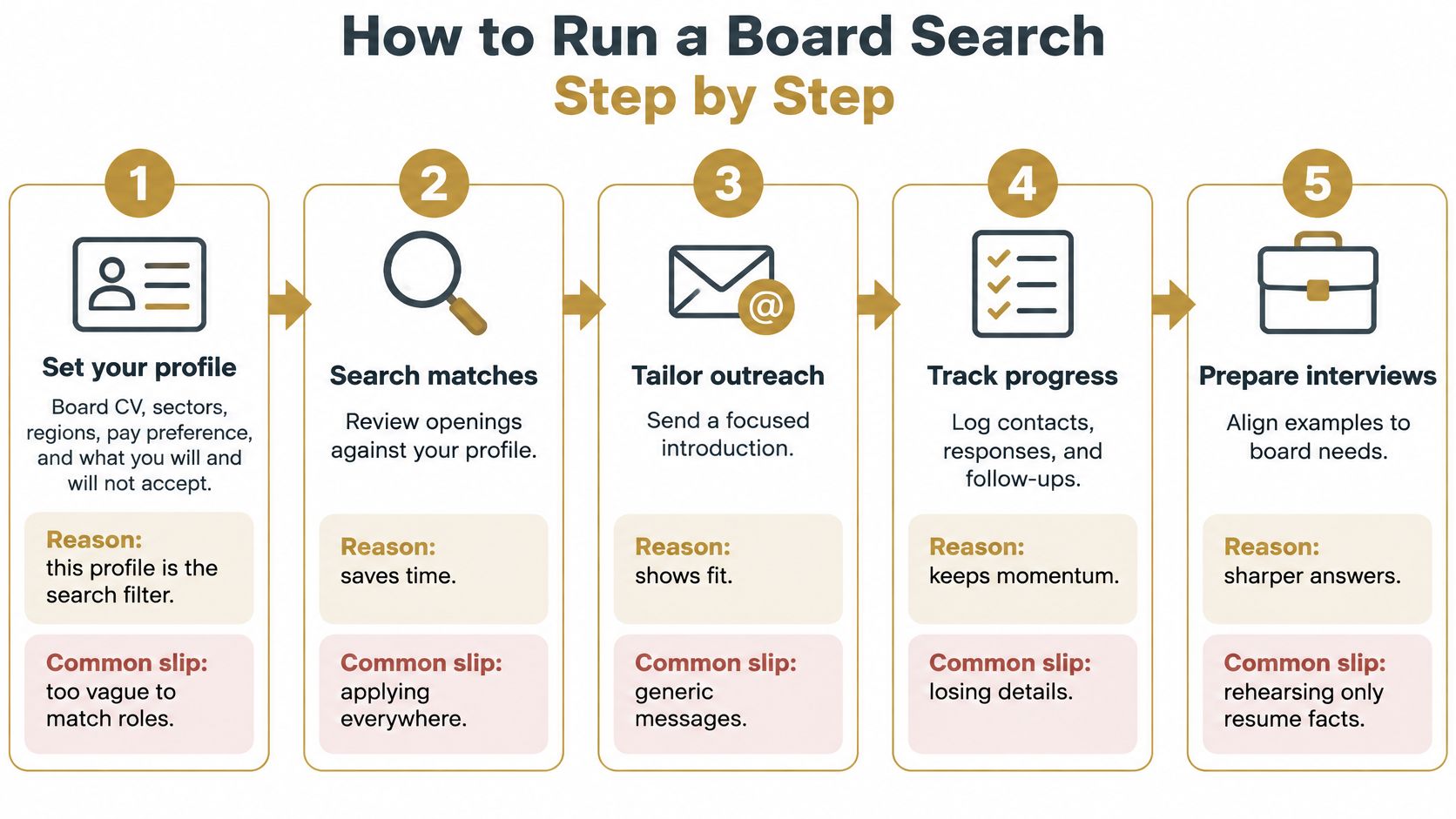
- Set your profile. Your director profile is the single input any search should work from, covering your board CV, sectors, geographies, pay preference and what you will and won't take. The common slip is vagueness, which produces matches you'd never accept.
- Audit target boards for composition gaps. Read who already sits on the board and its committees, then identify the missing capability, whether that's audit, cyber, technology or international operations. Applying where your skills duplicate three sitting directors wastes everyone's time.
- Test the time commitment. Spencer Stuart's guidance for prospective independent directors states directors should be prepared to devote more than 275 hours per year, including attending, preparing for and traveling to meetings. Check committee load and meeting cadence before you apply, not after an offer.
- Shortlist by fit and label each role. Mark every target as confirmed or forecast, with a note on timing. The slip here is treating a forecast like a live vacancy and approaching too bluntly.
- Build a governance packet per board. Prepare a CV that translates your career into governance value, a cover letter tied to that board's gap, a committee fit memo and an independence note. One reusable executive CV won't do this work.
- Map the warmest route in. Look for a shared connection, former colleague or adviser who can introduce you before any cold application. If you're weighing that route against a retained firm, compare how each works, including the differences set out for executive search firms.
- Prepare for chair questions. Expect strategy, oversight, constructive challenge and governance boundaries, not a walk through your résumé. Rehearse examples where you challenged a proposal without creating conflict.
You're ready to approach a chair when you can name the board's gap, explain your committee value in two sentences, and show you've tested the time commitment against your other obligations.
What Happens After You Are Appointed
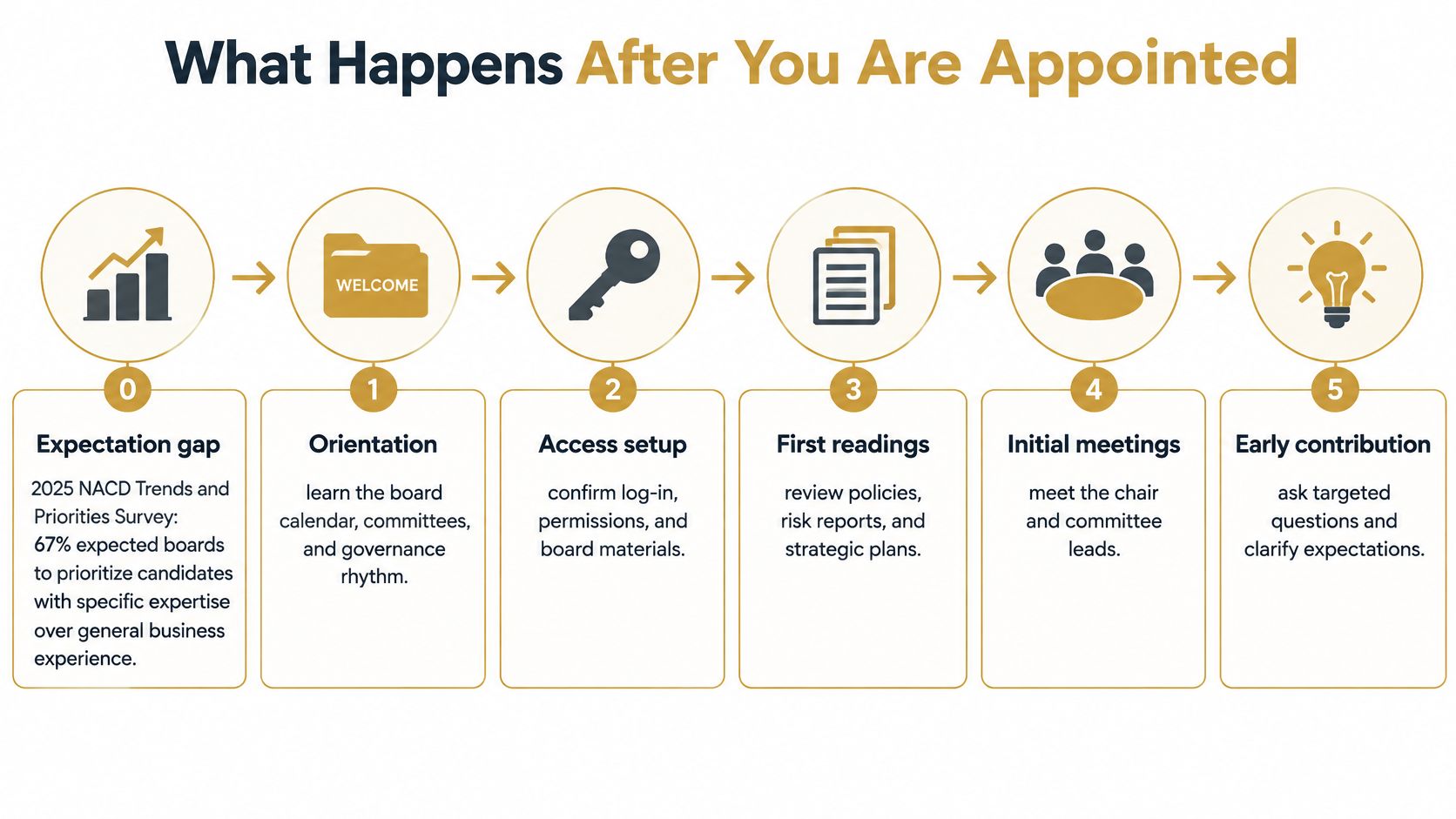
Appointment doesn't make you effective. That gap is widest for specialists, who are now in demand. The 2025 NACD Trends and Priorities Survey found 67% of respondents expected their boards to prioritize candidates with specific expertise over general business leadership experience, and industry-specific expertise was sought by 42%. A cyber or sector expert still has to contribute to strategy, finance and risk discussions outside that domain.
Your First Quarter, Phase by Phase
Days 1 to 30 are about access and context. Learn the portal properly, confirm your permissions and committee workspaces, meet the chair, committee leads and key executives, and complete the conflicts and independence review. Sit in and listen more than you speak. You're learning how this board makes decisions, not just what it decides.
Days 31 to 60 are about risk literacy. Ask for cyber and financial-risk briefings, read the board calendar across a full year, and work through prior minutes to see which issues recur. Before you sign anything binding, run your own checks with a board offer due diligence checklist so indemnities, insurance and time expectations are clear in writing.
Days 61 to 90 are about contribution beyond your label. Give feedback on your first substantive contribution and ask the chair how it landed. Start commenting credibly outside your specialist area, where your judgement, not your technical depth, is the point. Directors who stay in their lane get treated as advisers, not governors.
One habit to adopt: ask the chair for the board's written expectations of a director before your first meeting, not after your first mistake.
A portal can organise onboarding materials, calendars and training links. It can't build governance judgement or relationships for you. Treat the technology as the filing system for your first quarter, and the conversations as the actual onboarding.
Confirm Your Board Search Plan This Week
A 60-day plan beats drifting between listings. Momentum in a scarce market comes from a short list of actions done consistently, so decide your approach now and put a week-one structure around it.
- Confirm your profile and board CV. Lock sectors, regions, pay preference and your priorities so every match is judged against the same criteria.
- Check portal security against evidence. Work through authentication, encryption, permissions, recovery and device revocation.
- Adopt a written AI rule. Decide which tools, if any, may touch confidential papers.
- Pick two or three search channels. Combine live listings with forecasts or relationship routes, because listings alone show you only what is already public.
- Block weekly time. Reserve hours for outreach, due diligence and committee-load checks.
SeatSignal is one option for running that plan. Its Done-For-You Board Placement starts at about $3.25 per day ($1,188 per year) with yearly billing and no recruitment fees or retainers. The placement team handpicks relevant open board roles, checks each one for fit and live status before it reaches you, and prepares a director-grade packet (custom CV, cover letter, fit memo and independence note) for each opportunity, with board-specific interview preparation alongside.
Appointments, interviews, income and completion within 60 days aren't guaranteed; boards, nomination committees and recruiters make appointment decisions, and you remain responsible for your own decisions and due diligence.
Set your profile, choose your channels and start applying to roles matched to the gaps you fill. If you'd rather not run that search alone, visit SeatSignal to see how the placement team hand-picks matches and prepares applications.
Want a paid board role, done for you?
One handpicked, verified open board role every week, with a director-grade packet tailored for it.
Get Started